
 
     |
| Gcode driving me INSANE !! (Page 1/1) |

|
MidEngineManiac
|
OCT 12, 05:19 PM
|
|
OK guys, maybe you can see something here. I've been fighting this for 2 days. I am trying to create a permanent profile for the lithophanes, rather than setting them up every time. I get the base image here https://www.lithophanemaker.com/
OK, so I run a picture of the dog through it, download the file and drop it in Cura, gives me this..

Now, I dont want to print it vertical due to the layer/stress lines, so rotate it and slice it horizontal, gives me this...

Or the slived view

OK, now feed the Gcode back into cura to double-checks and I get this..

Notice its floating up in space....
NOW, when I send THAT to the printer, it prints it inverted (rotated 180) with the frame instead of the back down, so when it gets to the picture its trying to print in the air. I'm doing it back-down to elimate supports !!
I finally got it to stop printing vertically (90 degree rotation by the printer) so now its giving me 180 !!
HUH ????? 
|
|

|
MidEngineManiac
|
OCT 12, 05:29 PM
|
|
|
I dunno...maybe just slice it face-down and live with whatever rotational strangeness is going on ??? Normally I would have just taken a course on it, but with covid and all night-classes shut down I've been learning on the fly. [This message has been edited by MidEngineManiac (edited 10-12-2020).]
|
|
|
|
williegoat
|
OCT 12, 05:52 PM
|
|
#1 - it is meant to be printed vertically (standing up)
#2 - in your last image, it is half way up the wall because when oriented properly, it is in the middle of the print bed
In other words, the distance from the bed to the object, when represented horizontally in your last image; is the same distance from the side wall to the object, when the object is printed vertically.
|
|
|
|
MidEngineManiac
|
OCT 12, 06:00 PM
|
|
|
It is meant to be done vertically, and they do turn out nice....BUT are fragile. I've broken a couple along layer lines just dropping them. I figure if I can get them to work horizontal the durability goes way up. Bad for repeat sales but great for recomendations.
|
|
|
|
williegoat
|
OCT 12, 06:29 PM
|
|
Maybe a picture will help.
This is why your object is "floating in space":
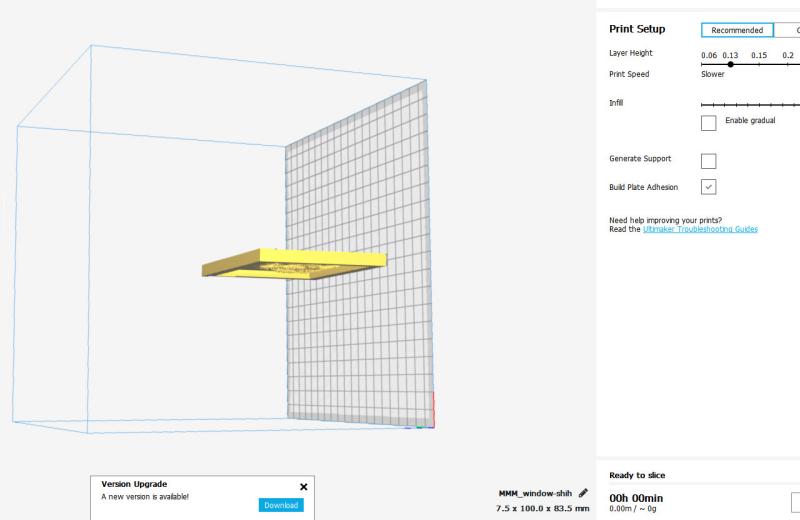 [This message has been edited by williegoat (edited 10-12-2020).]
|
|
|
|
MidEngineManiac
|
OCT 12, 06:32 PM
|
|
I got that part. I'm actually printing out a heart-shaped one on the flat right now and ITS WORKING !!  (so far). Bonus is its going from 6 hours down to 4 doing it this way. I did one of those yesterday on the vertical, got to 90% done and the print head knocked it over. Start again. (so far). Bonus is its going from 6 hours down to 4 doing it this way. I did one of those yesterday on the vertical, got to 90% done and the print head knocked it over. Start again.[This message has been edited by MidEngineManiac (edited 10-12-2020).]
|
|
|
|