|
| New 3D printer: Creality 3 V3 SE (Page 4/7) |

|
williegoat
|
NOV 20, 09:56 AM
|
|
I will , of course, defer to the guys with the experience, but I have a couple of questions for Wichita.
1) Did you follow all of the setup steps exactly as described in the manual and/or online videos?
These are the things Mr. Pennock and TDA are talking about. I know we are guys and tend to ignore directions, but this is a precision machine and requires precise setup.
2) What are the conditions in the room? Temperature, humidity, airflow, etc. ?
If you are printing in the garage in Kansas right now, it is cold and wet. If an old lady goes by your window on a bicycle, grab Toto and head for the root cellar.
3) Did you print the .gcode file that came with the printer as your first print?
If the supplied test print fails, the problem is with the printer or setup. If the supplied print is the only thing that works, the problem is something else.
|
|

|
TheDigitalAlchemist
|
NOV 20, 11:17 AM
|
|
Yeah, as Cliff said, the filament looks as untouched as I me during my prom. wait... 
I've never used anything other than a good intense stare to keep the print stickin' proper. no glue sticks or spray or such stuff.
I was thinkin' was that the printer doesn't know that you have a magnetic bed sheet, but that shouldn't change things between the auto head thingie that pops down and the distance between the nozzle and the bed...
but here, lookie HERE:
Once the bed is level, go to the Z offset settings in the tune menu to adjust the Z offset in real-time. Then, bring your printer to its home location (auto home) and change the Z offset value so the nozzle is just above the bed.
Then do the Cliff-paper thing and try again, and get your satisfaction
|
|
|
|
Cliff Pennock
|
NOV 20, 11:51 AM
|
|
If you are wondering what in the picture convinces me your first layer height is way to high, it's this:
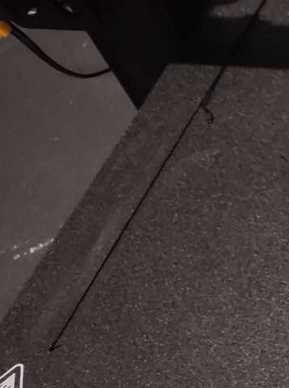
That shouldn't look like that. It should look squashed. The first layer height should be a lot less than the "normal" layer height.
|
|
|
|
williegoat
|
NOV 21, 02:41 PM
|
|
 [This message has been edited by williegoat (edited 11-21-2023).]
|
|
|
|
IMSA GT
|
NOV 21, 05:26 PM
|
|
This is for Wichita. Sorry to hijack Willie
|
|
|
|
Wichita
|
NOV 25, 07:09 PM
|
|
Thank you for the YouTube video.
I've had a few successful prints, just small test stuff. Some failures. Decided to to to print something useful, which is a AA/AAA battery holder. The slicer says it's a 10-hour print.
So we will see. So far about an hour has passed by and it's still doing ok.
|
|
|
|
williegoat
|
NOV 25, 07:30 PM
|
|
| quote | Originally posted by Wichita:
Thank you for the YouTube video.
I've had a few successful prints, just small test stuff. Some failures. Decided to to to print something useful, which is a AA/AAA battery holder. The slicer says it's a 10-hour print.
So we will see. So far about an hour has passed by and it's still doing ok. |
|
Well, that's certainly good to hear.
Post a pick when you get a print you like.
|
|
|
|
williegoat
|
DEC 07, 12:15 AM
|
|
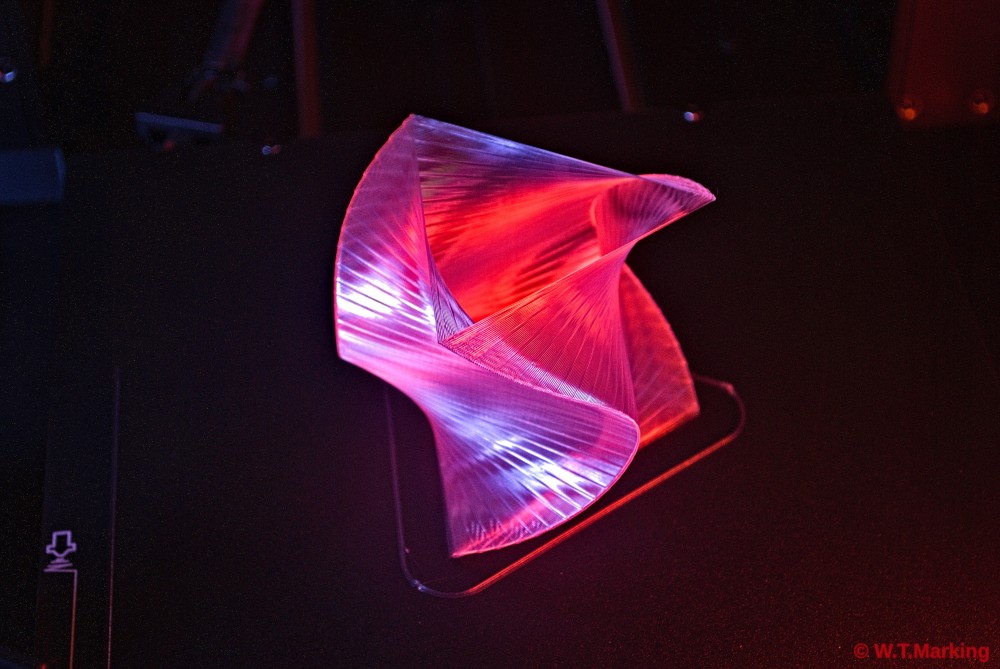
I will upload the timelapse video of this print tomorrow. This is starting to get real fun.
|
|
|
|
williegoat
|
DEC 07, 03:03 PM
|
|
I found the model on Thingiverse: https://www.thingiverse.com/thing:4235376
Printed with Elegoo clear PLA on a Creality Ender 3 V3 SE
Octolapse settings:
stabilization: center right
trigger: smart-snap to Print
60fps
photo info:
Nikon D60
50mm (35mm equiv. 75mm)
1/30 sec
f5.6
background music is me on electric fiddle and classical guitar
|
|
|
|
williegoat
|
DEC 09, 03:57 PM
|
|
|
|
|