
 
     |
| Pimp my PC (Page 2/6) |

|
ls3mach
|
JUN 13, 08:18 PM
|
|
| quote | Originally posted by A_Lonely_Potato:
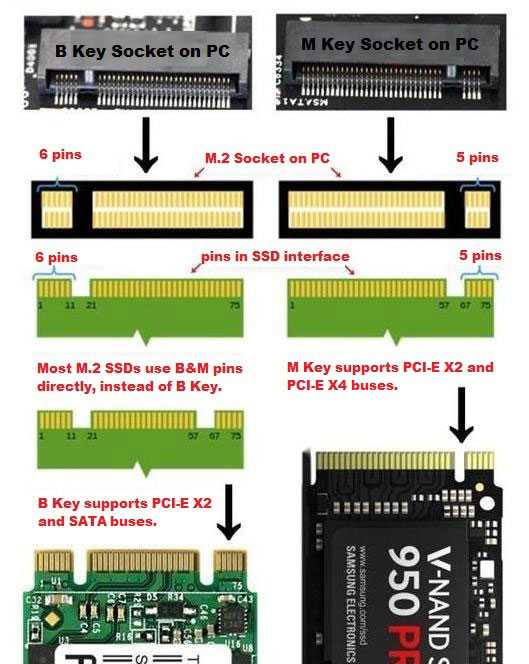
With yall talking about M.2, it should be said they are not equal. M.2 is just a physical connector. What is important is the communication protocol. You can get M.2 drives that still use the SATA III protocol, and will yield no benefit over a standard 2.5" SATA III SSD. You want to get an NVMe M.2 SSD. NVMe uses i believe 4 PCIe lanes, and is mind bogglingly faster than SATA. Both NVMe and SATA can be run on M.2 ports. Some M.2 ports only support SATA, but if it supports NVMe it likely supports both. Easiest way to tell if a drive is NVMe or SATA is by the connector, SATA has 2 gaps in the pins while NVMe only has one.
 |
|
This is solid solid information. I am sure it is something Jake, Chris and Todd already knew. Willie's system obviously would be too old to utilize. I haven't heard of anyone adding an expansion to an older PC. I would think the other components at that point are probably a bottle neck and not worth it. Would be fun to see test though.
When I was doing Dell Mini they were coming with uBuntu. Everyone was hot to buy them from me, but all wanted to install bootleg Windows or Hackintosh. I have tried many distros over the years. I think Red Hat or Mandrake were my first foray. When I was playing WoW obviously had to have Windows. At work I wanted to swap us to a unix environment, but I just couldn't get any inventory systems that I liked. Quickbooks and Peachtree for all the expense and flaws are used so often because they're widely supported and easy to use. Emulation wasn't very unusable and the online access was all but useless, which would have been my preferred method for all to access.
These days I just run an old T470 and Win10. I keep looking out for the T480, the last of this particular build type. All the chassis parts are the same for like 4 lines so I slowly just swap to better stuff. It is exactly what I used to do with the Dell Mini. I bought mine for $99 or less than swap all the guts from others until mine was maxed.
|
|
|
|
Jake_Dragon
|
JUN 13, 09:03 PM
|
|
| quote | Originally posted by A_Lonely_Potato:
With yall talking about M.2, it should be said they are not equal. M.2 is just a physical connector. What is important is the communication protocol. You can get M.2 drives that still use the SATA III protocol, and will yield no benefit over a standard 2.5" SATA III SSD. You want to get an NVMe M.2 SSD. NVMe uses i believe 4 PCIe lanes, and is mind bogglingly faster than SATA. Both NVMe and SATA can be run on M.2 ports. Some M.2 ports only support SATA, but if it supports NVMe it likely supports both. Easiest way to tell if a drive is NVMe or SATA is by the connector, SATA has 2 gaps in the pins while NVMe only has one.
|
|
Yes I should have explained it better, take it for granted when I'm not talking to PC guys that they will just know what I'm thinking 
Well done explanation.
This is the one I got, was the largest one the laptop would support. I got two but ended up using one in my desktop when I found out it would also support it.
SAMSUNG 980 SSD 1TB M.2 NVMe[This message has been edited by Jake_Dragon (edited 06-13-2022).]
|
|
|
|
ls3mach
|
JUN 13, 11:37 PM
|
|
| quote | Originally posted by Jake_Dragon:
Yes I should have explained it better, take it for granted when I'm not talking to PC guys that they will just know what I'm thinking
Well done explanation.
This is the one I got, was the largest one the laptop would support. I got two but ended up using one in my desktop when I found out it would also support it.
SAMSUNG 980 SSD 1TB M.2 NVMe
|
|
Why won't it support larger? You don't mean physically larger, right?
|
|
|
|
Jake_Dragon
|
JUN 14, 12:37 AM
|
|
| quote | Originally posted by ls3mach:
Why won't it support larger? You don't mean physically larger, right? |
|
The laptop bios wouldn't support the 2 TB drive. As the price difference between 1TB and 2TB was significant I was just going to install two 1TB drives in my laptop and call it a day.
But once I saw how much of an improvement it made in the laptop I put the second one in my PC as the boot drive.[This message has been edited by Jake_Dragon (edited 06-14-2022).]
|
|
|
|
A_Lonely_Potato
|
JUN 14, 02:29 AM
|
|
| quote | Originally posted by ls3mach:
Willie's system obviously would be too old to utilize. I haven't heard of anyone adding an expansion to an older PC. I would think the other components at that point are probably a bottle neck and not worth it. Would be fun to see test though. |
|
Since NVMe uses PCIe, you can get an expansion card that just slots into a PCIe slot on your mobo, so he could do it. Realistically, there isn't a whole lot of real world improvement going from a SATAIII SSD to an NVMe, unless you deal with data transfers a lot of the time. A lot of subsystems arent optimized for 2GB/s read and writes, and can't take full advantage of it. Let alone the new gen5 ones, (8 GIGABYTES a second???? ) )
| quote | | ...When I was playing WoW obviously had to have Windows. At work I wanted to swap us to a unix environment... |
|
I want to get out of windows at some point, but i primarily use my computer for gaming and the support just isnt there yet. Valve is making huge progress, but there's still a ways to go.
| quote | | These days I just run an old T470 and Win10. I keep looking out for the T480 |
|
Desktop for me, Ryzen 5 3600, 1070ti. Looking to upgrade my card soon though, it pulls its own, but a 3070 can do so much more...[This message has been edited by A_Lonely_Potato (edited 06-14-2022).]
|
|
|
|
82-T/A [At Work]
|
JUN 14, 08:06 AM
|
|
| quote | Originally posted by ls3mach:
This is solid solid information. I am sure it is something Jake, Chris and Todd already knew. Willie's system obviously would be too old to utilize. I haven't heard of anyone adding an expansion to an older PC. I would think the other components at that point are probably a bottle neck and not worth it. Would be fun to see test though. |
|
No way man, I wish. I agree, that was awesome information, I did the right-click, save-as dance on that one.
~20 years ago, I was pretty confident enough to say I knew all the standards and knew all the things (which I didn't, but at least I thought I did). I kind of stopped paying attention at some point, and things have changed so much. Back in the day, we had only a few standards for things like chips... you had the various ZIF sockets in the Pentium days, and prior to that it was chip pullers. But now there are probably close to ~30 different socket types. I purchased a Lenovo Legion about 2 years ago. It has a Core i9 3.4Ghz processor with 8 cores. I wrongly assumed that because it was an i9, and only two years old, that I could easily upgrade to the newer Core i9s whenever I wanted to. I was wrong. Apparently what I have is the best processor for that socket, and ALL the other newer i9s (of which there are many now) won't fit my motherboard. Ugh... haha...
Stuff changes so fast now... but things are light-years ahead of what they were ~20 years ago. It's really hard to keep up.
|
|
|
|
williegoat
|
JUN 14, 12:46 PM
|
|
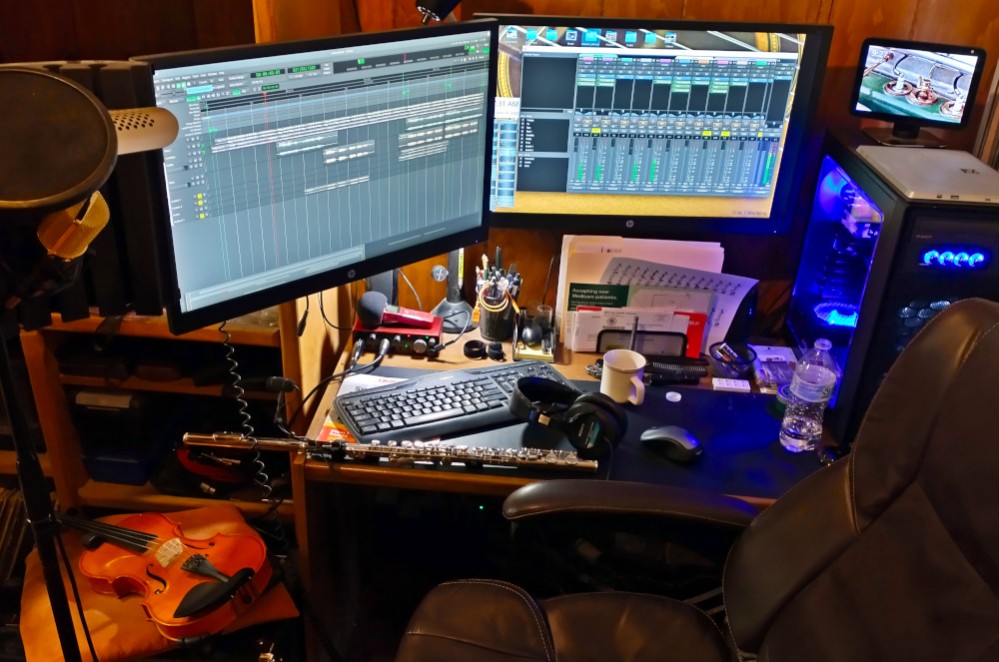
The machine in its natural environment, working on a song.
 [This message has been edited by williegoat (edited 06-14-2022).]
|
|
|
|
A_Lonely_Potato
|
JUN 14, 03:31 PM
|
|
| quote | Originally posted by 82-T/A [At Work]:
I purchased a Lenovo Legion about 2 years ago. It has a Core i9 3.4Ghz processor with 8 cores. I wrongly assumed that because it was an i9, and only two years old, that I could easily upgrade to the newer Core i9s whenever I wanted to. I was wrong. Apparently what I have is the best processor for that socket, and ALL the other newer i9s (of which there are many now) won't fit my motherboard. Ugh... haha...
Stuff changes so fast now... but things are light-years ahead of what they were ~20 years ago. It's really hard to keep up. |
|
Intel has been REALLY bad about socket support. Pretty much every generation for the last i htink 8 years has needed a new socket. AMD has had amazing support for the AM4 socket, i think we are on 5 generations of CPUs on the same socket? Some motherboards have had issues with support, due to having 16MB BIOS chips and not 32MB(which was needed for supporting the new and old CPUs. They could update for the newer ones but had to drop support for older, so it was an imperfect solution) Some chipsets also didn't play well with the newest CPUs.
|
|
|
|
ls3mach
|
JUN 14, 09:36 PM
|
|
| quote | Originally posted by 82-T/A [At Work]:
No way man, I wish. I agree, that was awesome information, I did the right-click, save-as dance on that one.
~20 years ago, I was pretty confident enough to say I knew all the standards and knew all the things (which I didn't, but at least I thought I did). I kind of stopped paying attention at some point, and things have changed so much. Back in the day, we had only a few standards for things like chips... you had the various ZIF sockets in the Pentium days, and prior to that it was chip pullers. But now there are probably close to ~30 different socket types. I purchased a Lenovo Legion about 2 years ago. It has a Core i9 3.4Ghz processor with 8 cores. I wrongly assumed that because it was an i9, and only two years old, that I could easily upgrade to the newer Core i9s whenever I wanted to. I was wrong. Apparently what I have is the best processor for that socket, and ALL the other newer i9s (of which there are many now) won't fit my motherboard. Ugh... haha...
Stuff changes so fast now... but things are light-years ahead of what they were ~20 years ago. It's really hard to keep up. |
|
I bought a, I want to say LGA1175, years ago thinking I could just pop a new one in too. It was an i7 and a K series. It was the "business class" damned if it has ever got an upgrade as it seems it was just abandoned. Same crap as your i9.
I was thinking about different I/O the other night when I had an issue with an old HDD. I was thinking about how my first computer wouldn't even take a PS2 mouse and how if I told anyone that today they'd wonder what I was trying to use Playstation stuff with my old hardware.
My issue is I could only recover drives from a computer. Ordered a SATA to USB. It only does SATA that takes the old molex adapter or power. I don't know what that swift was maybe a change in SATA standard, but now I have to order another one that supplies power through the USB.
Here is one I have been seeing my entire life and not once have I ever used one. RS-232. I have always heard it as a programming port. It was on TONS of TVs. TVs which I never saw get an update. I think that is the right one.
|
|
|
|
williegoat
|
JUN 14, 09:47 PM
|
|
| quote | Originally posted by ls3mach:
Here is one I have been seeing my entire life and not once have I ever used one. RS-232. I have always heard it as a programming port. It was on TONS of TVs. TVs which I never saw get an update. I think that is the right one. |
|
Before USB, that was how peripherals connected.
|
|
|
|