
 
     |
| Reliable external hard drive recommendations (Page 2/3) |

|
hnthomps
|
APR 13, 09:52 AM
|
|
I am currently using two separate "backup" hard drives. My two TB one (WD My Cloud) has been in service for about eight years and my eight TB drive (Segate Backup Plus Hub) for about five years. No issues with either of them.
I have also converted one desk top and one laptop to solid state drives to speed up the boot process and have been happy with both of these setups.
Nelson
|
|

|
theogre
|
APR 13, 12:12 PM
|
|
Any Flash media can drop data w/o power for months to years. So don't think you backup and save whatever w/o power to them "forever."
More so if stored in hot, cold or otherwise outside of spec for a given media.
I have older flash media that can't even mount because "format" is corrupt after sitting for several years.
If you have backups to writable CD/DVD and never check in years... data can be gone from them too. Dies fad, can get mold eating layers, etc.
"Factory Printed/Pressed" CD etc can "rot" too.
HD can keep data for 10 years or more w/o power and in very iffy environments if you have something to plug them in. Example: Most MoBo built in last 5+ years doesn't take Parallel ATA/IDE and even starting harder to get external cases for them.
Currently I use external USB3 HD, 1 or 2 TB each, and keep unplugged when not used.
"Laptop" size units can run on USB2 but at much lower speeds because of limited power.
Many think can use account setting for NAS and other Server Types often has find a server w/ ransom ware etc whacking the whole data store.------------------
Dr. Ian Malcolm: Yeah, but your scientists were so preoccupied with whether or not they could, they didn't stop to think if they should.
(Jurassic Park)
The Ogre's Fiero Cave
|
|
|
|
RWDPLZ
|
APR 13, 01:04 PM
|
|
Samsung EVO SSD's for operating system and programs, and hard disks for data storage. I have about a dozen Western Digital Red drives and none have failed yet *knock on wood*
Backup
Backup
Backup
|
|
|
|
williegoat
|
APR 13, 02:24 PM
|
|
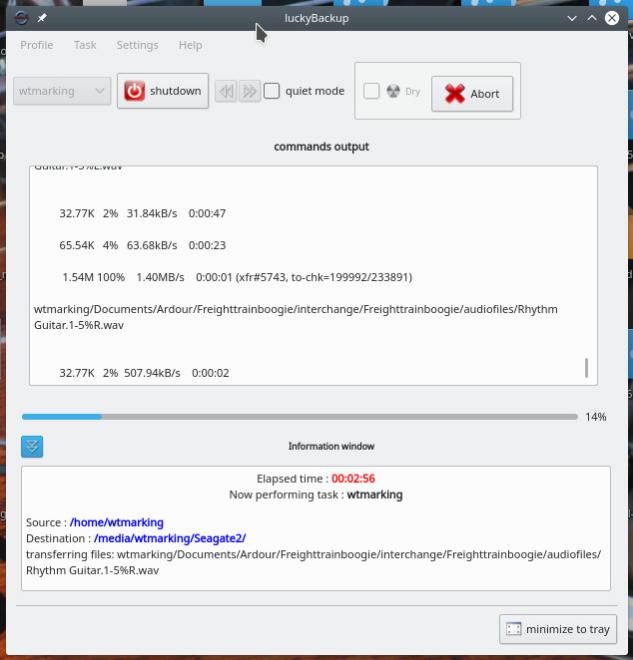
This thread reminded me that I should do a backup, so I thought I would share the tool that I use: http://luckybackup.sourceforge.net/
It is free, easy to use, simple and reliable. I use it on Debian Gnu/Linux but there is a Windows version available.
|
|
|
|
williegoat
|
APR 13, 03:05 PM
|
|
| quote | Originally posted by RWDPLZ:
I have about a dozen Western Digital Red drives and none have failed yet *knock on wood*
|
|
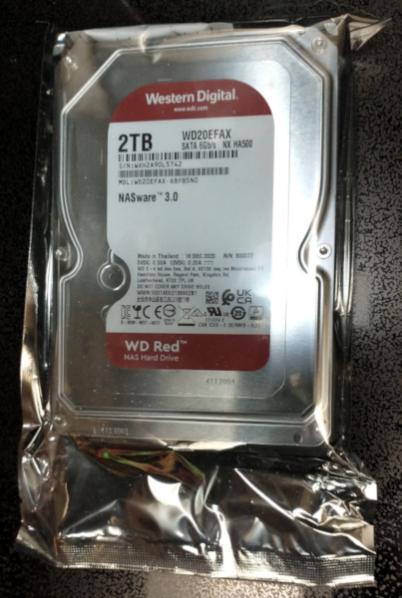
That is what I use in my server and I just bought another for a planned upgrade.
|
|
|
|
2.5
|
APR 13, 04:44 PM
|
|
| quote | Originally posted by theogre:
Any Flash media can drop data w/o power for months to years. So don't think you backup and save whatever w/o power to them "forever."
More so if stored in hot, cold or otherwise outside of spec for a given media.
I have older flash media that can't even mount because "format" is corrupt after sitting for several years.
-
HD can keep data for 10 years or more w/o power and in very iffy environments if you have something to plug them in. Example: Most MoBo built in last 5+ years doesn't take Parallel ATA/IDE and even starting harder to get external cases for them.
|
|
When you say HD, the Toshiba Randye mentioned, and the Western Digital such as Williegoat's photo, they qualify as HD's not "Flash media" correct?
I assume Flash media only refers to flash drive / thumb drive?
Thanks
PS I'm mainly concerned about data, files, etc, not restoring the pc.[This message has been edited by 2.5 (edited 04-13-2021).]
|
|
|
|
TheDigitalAlchemist
|
APR 13, 06:55 PM
|
|
IMO, Your "important data" shouldn't live primarily on your computer(s), it should chill off an an nice comfy sofa, like a NAS or an external drive.
SSDs are so cheap now, a 512 GB one should suffice for a laptop and a 1TB should be enough for a desktop. And then you can have gallopfaflops of storage on a NAS or multiple NASes.
Having one copy in a different location is also a good idea.
bcause fires and floods and robbers and scary wind things and gigantic rodent attacks happen.
|
|
|
|
Lambo nut
|
APR 13, 07:15 PM
|
|
| quote | Originally posted by williegoat:
That is what I use in my server and I just bought another for a planned upgrade.
|
|
I use the WD Purples in my home serveillance systems. Writing and overwriting 24/7/365. Get about 5 to 7 years before crapping out.
|
|
|
|
theogre
|
APR 13, 08:32 PM
|
|
| quote | Originally posted by 2.5:
When you say HD, the Toshiba Randye mentioned, and the Western Digital such as Williegoat's photo, they qualify as HD's not "Flash media" correct?
I assume Flash media only refers to flash drive / thumb drive?
Thanks
PS I'm mainly concerned about data, files, etc, not restoring the pc. |
|
HD is HD. I'm not looking up models etc above.
Small External HD like WD Passport line and Laptop Internal Drives have features to protect if you bump them. Dropping anything including HD or SSD onto hard surface can break them but many of these drives can even survive that to a point.
USB3 drives should still be "alive" for Years. Like most old USB devices still work only that MS and others stopped making drivers. But USB HD and SSD don't need drivers and nearly all old USB1.x and USB2 HD's still work. WD and others have software tools to backup or encrypt a drive but you don't need that just to backup folders and files. I don't even install their tools because can cause problems w/ other tools and devices.
But USB HD and SSD won't work some devices mainly because can handle power needed. Some here many remember USB HD w/ 2 USD A plugs to get enough power or need a wall wart. Example: A phone w/ USB C port likely have limits on power out to whatever.
Internal and external SSD is Flash media. Better then most SDcard, "Thumb" drives, etc. but still uses Flash memory.
If you have data on old Flash, Often is a gamble if it still mounts and reads. That's If you have a "Reader" to use them. Many here likely have SmartMedia, xD Picture Card, or 1 or more formats of Sony Memory Stick but nothing to read them on a PC.
Other Notes:
Most new Big SSD are Multi Cell Flash, currently most are 4 bits per Cell of memory.
For backups, likely won't care these are much slower and wear out faster then single and 2 bit cells.
But Anyone using SSD in RAID array should know very well how the work.
Many Big HD 2TB or bigger, can have "shingle recording " for some to all data.
Backups often won't care but other use can be problems...
HD in RAID including Some "Red" Drives should know has several lawsuits across brand for shingle recording and make sure don't use ones in them.[This message has been edited by theogre (edited 04-13-2021).]
|
|
|
|
williegoat
|
APR 13, 09:17 PM
|
|
| quote | Originally posted by theogre:
Many Big HD 2TB or bigger, can have "shingle recording " for some to all data.
Backups often won't care but other use can be problems...
HD in RAID including Some "Red" Drives should know has several lawsuits across brand for shingle recording and make sure don't use ones in them.
|
|
Is there a data integrity problem with SMR drives or just a performance issue?
|
|
|
|