
 
     |
| Wireless Keyboard/Mouse combo recommendations? (Page 2/2) |

|
Jonesy
|
JAN 02, 03:56 PM
|
|
| quote | Originally posted by theogre:
Many Should NOT use wireless KB and "Mice." Besides they eat batteries or need changing, many have big security problems.
Logitec and some others w/o using Blutooth have some encryption software but when battery dies often lose the encrypt keys and few will check and relearn after changing/charging the batteries. But Many units w/ Blutooth have problems too.
As to wear out after only a few years... Even just a year or two...
Very few KB including some higher $ units have keys that will last long.
Unless you "touch type" Ergo KB's are fairly useless. If has disable user is often worse then useless.
If you eat/drink near KB then most key marking ink wears off and fast. Even when food/drink doesn't get on/in them.
If you work on cars etc and touch KB w/ dirty hands have same problem.
People let finger nails touch then often have same problem and not just long nails either.
The only keys that last here is keys double molded w/ 2 colors of plastic so marking is in the key.
Even they wear out but can see markings longer.
Many different KB "guts" and switch types to cover here fast. Even best switches won't last long w/ food/dirt getting at them. Oddly while many claim "membrane" switch KB suck, they last better in dirty spaces because plastic layer keep out all but worse crap. Many "membrane" switch KB can be cleaned even then.
Even Original IBM and Apple KB in 80's made a lot better then nearly all current units had same problems. Now Some current units from Dell and others have drain holes so Business owners don't have a warranty claim for every coffee soak KB.
[QUOTE]Originally posted by Jonesy:
Microsoft makes good quality keyboards and mice.. |
|
M$ Does Not make KB's or anything else and never did.
M$ KB and most other things are made by whatever 3rd party is "cheap."
Example: Keytronics made many M$ KB for years but don't know the current maker.
But M$ had good KB software and supported macros too but stopped many features in newer IntelliType Pro.
I'm using an old version ITP so can still use macros in FF etc. I have FF macros for °F, Ω, and others because needs HTML Special Characters for many of them.
Logitec and others make crap to good KB and "mice" but very few work well w/ left hand.
[/QUOTE]
I dunno, iv had the same logitech gaming keyboard for about 10 years.. Its wireless, works perfectly, has yet to ever give me a problem, and i do a lot of gaming on it. Same with my mouse, 10 years old, works perfectly, although the "slide pads" on the bottom have worn down to practically nothing, but still doesn't hinder my movement while gaming.. Of course im pretty good about keeping my keyboard clean..
To each their own i guess.
|
|
|
|
theogre
|
JAN 04, 12:54 AM
|
|
| quote | Originally posted by Jonesy:
I dunno, iv had the same logitech gaming keyboard for about 10 years.. Its wireless, works perfectly, has yet to ever give me a problem, and i do a lot of gaming on it. Same with my mouse, 10 years old, works perfectly, although the "slide pads" on the bottom have worn down to practically nothing, but still doesn't hinder my movement while gaming.. Of course im pretty good about keeping my keyboard clean..
To each their own i guess. |
|
I've dealt w/ hundred to thousands KB and "Mice" of every brand and type for my job for many years.
Logitech Dell HP IBM/Lenovo M$ and more have problems listed above and more.
Logitech has made some crap same as other "big brands" but even good product... Logitech like M$ makes many things and dump support a few years later so a "mouse" or KB may work but only at the basic level because software won't run and not supported. Many Logitec cameras and other parts would work but no drivers available anywhere. More so w/ x64 systems.
Same happens w/ ASUS and many other "generic"/"white box" MoBo used by everyone that isn't an OEM like Dell. Many ASUS utilities won't install and/or run after M$ updated whatever and ASUS won't fix the problem(s) and ignores all mention of same on every site including ASUS site.
|
|
|
|
maryjane
|
JAN 04, 09:39 AM
|
|
What a 5 yr old cheap Insignia wireless mouse looks like.
(the white spots are where the blue paint wore off.)
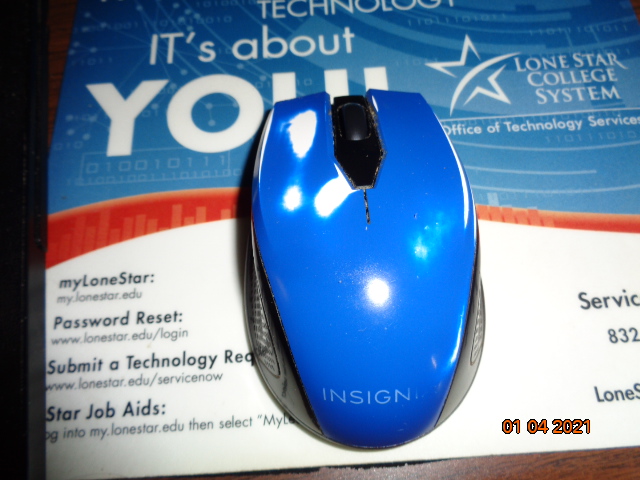
|
|
|
|
williegoat
|
JAN 04, 02:00 PM
|
|
| quote | Originally posted by maryjane:
What a 5 yr old cheap Insignia wireless mouse looks like.
(the white spots are where the blue paint wore off.)
 | | CLICK FOR FULL SIZE |
|
|
I see no need to replace something that still adequately performs its function, but a couple of keys and one mouse button are occasionally failing to make their connections.
The mouse has lost its feet, the "slide pads" as Jonesy calls them, and that makes it difficult to accurately place the cursor. My mouse has a thin rubbery coating which, like your blue paint, is flaking off, leaving my mouse looking like it has a bad case of the mange. Most decent people refuse to touch it.
|
|
|
|
maryjane
|
JAN 04, 06:10 PM
|
|
Mine long ago lost it's slide pads. I have to occasionally clean the bottom of it off,as some dark crud builds and makes it a little harder to slide about.
Speaking of mice and men...is there still a way to change the color and size of the cursor..in win 10?
With not-so-good eyes now, I sometimes 'lose track' of the the white cursor. (a fluorescent yellow would be nice)
|
|
|
|
williegoat
|
JAN 04, 06:34 PM
|
|
| quote | Originally posted by maryjane:
Speaking of mice and men...is there still a way to change the color and size of the cursor..in win 10?
With not-so-good eyes now, I sometimes 'lose track' of the the white cursor. (a fluorescent yellow would be nice) |
|
Go to: Settings > Devices > Mouse
- in the upper right corner you will see:
Related settings
-Adjust mouse & cursor size
-Additional mouse options
You should find what you are looking for.
|
|
|
|
maryjane
|
JAN 04, 07:20 PM
|
|
Thanks. Finally found it in Win Control Panel/devices/mouse.
Changed size and then color to black with white outline.
|
|
|
|
theogre
|
JAN 05, 12:51 AM
|
|
| quote | Originally posted by maryjane:
Mine long ago lost it's slide pads. I have to occasionally clean the bottom of it off,as some dark crud builds and makes it a little harder to slide about.
Speaking of mice and men...is there still a way to change the color and size of the cursor..in win 10?
With not-so-good eyes now, I sometimes 'lose track' of the the white cursor. (a fluorescent yellow would be nice) |
|
Several ways can replace slid feet. Red Tyvek tape uses to install Tyvek house wrap is one but is rare for most people to get and won't use mush else. (Plus Glue is very aggressive to most tapes sold at normal retail. Made to seal Tyvek joints for big projects.)
Win7 and think 10 can use many old themes but 10 doesn't use Aero so many Vista/7 themes break some items on 10.
My cave maybe still have a Fiero them w/ yellow cursors, some animated one.
If Win10 still has "Display pointer tails" in mouse pointer options, set a short tail can help find pointers on big and/or multiple displays. (I have Win10 machine but not looking at it now.)
"Show location" may help too but goes off nearly every time you hit control key and many find it annoying after a few hours to days.
|
|
|
|
maryjane
|
JAN 05, 03:17 AM
|
|
|
Yes-- "Display pointer tails" is still an option in W10. I saw that option while changing colors and size. I lever really liked it much tho.
|
|
|
|