
 
     |
| Can I manually manipulate my idle speed? (Page 9/10) |

|
Patrick
|
MAY 09, 12:26 AM
|
|
| quote | Originally posted by Kitskaboodle:
Patrick, ok I get your point about my tach being off. But 500 rpm off? 🙁 Oh my, that’s not acceptable. I supposed I just got used to it being off. Anyways, is there any way to adjust/re-calibrate it? I’ve never done this or heard of anyone adjusting / re-calibrating a Fiero V6 tach.
|
|
Kit... Paul addressed that on the first page of this thread.
| quote | Originally posted by Romsk Here:
For my own edification:
Are you checking Idle RPM using the Fiero's Dashboard guage, or with a Ignition Tool?
When you put the ALDL in DMDIAG Mode, one of the things it does it force the idle to 1000 RPM. It may waver but the ECM will try to hover around 1000 on average.
Use the Paperclip trick to put the ECM in DMDIAG Mode, don't drive in this mode, the Timing Advance is disabled so you don't fight the ECM setting it to 10 degrees BTDC.
The Fiero Tachometers are around 40 years old now. Capacitors in their circuitry are starting to drift way out of tolerance. There are ways to recalibrate the Tachometer, but it requires a small circuity change. Leave that for later, a good Ignition Tachometer Tool or ALDL Tool will give you more accurate readings.
|
|
|
|
|
|
Patrick
|
MAY 09, 12:40 AM
|
|
Kit, I'm wondering since your MAP sensor is providing no signal whatsoever to the ECU, that perhaps the ECU is running in a sort of "limp" mode... and perhaps this is affecting the idle RPM... although I suspect your wonky tachometer is 90% to blame for what has appeared to be a higher than normal idle speed.
|
|

|
armos
|
MAY 09, 04:24 AM
|
|
So your tach reads 1500RPM when the signal to the ECM is saying 1000RPM.
That's a 6/4 difference.
I don't know exactly what goes on inside the tach and how it gets set to 4 vs 6 cylinders, but I wonder if somehow your tach is operating in 4 cylinder mode - thus miscounting the RPM by this exact amount of error.
|
|
|
|
fieroguru
|
MAY 09, 06:58 AM
|
|
With the engine idling at 1000 rpm in all the scans, the IAC steps are not bottoming out. If the ECM was actually trying to lower the idle to say 850 rpm and the engine would not allow it to go below 1000, then the IAC steps would go to 0 or very close to zero. This means the ECM is not tryng to lower the idle, so it is idling right where its settings are telling it to idle, so you do not have an idle issue.
Your MAP sensor might be unplugged and this could be the cause of the higher commanded idle.
You can buy an new tach board to address the tach readng high.
https://www.ebay.com/sch/i....fiero+tach&_osacat=0
|
|
|
|
Kitskaboodle
|
MAY 09, 10:10 AM
|
|
Thanks Fieroguru for the link on the tach board. I will order one today.
Regarding the tach accuracy, it had not even dawned on me that my tach would be soooo wildly off. I assumed it was within spec (and believed it’s accuracy) but I can see now that I’ve been “duped” by my tach. 🙁 Hmmm, there are plenty of other Fiero’s out there with the same tach built at the same time as mine yet (unless I missed it) I don’t hear anyone complaining about tach accuracy. Maybe a bunch of 86-88 V6 owners are presently being “duped” by inaccurate rpm readings and they don’t even know it. 🙁
On another note, I will be checking/ testing the MAP connector voltage this morning and will report back.
Kit
P.S. By the way, just for the record, some of you may not know that I upgraded my 85 GT with an 86-88 V6 cluster. The 85 Fiero has a much lower max mph calibration/ numbers on it. I also added the aux. gauge pkg.[This message has been edited by Kitskaboodle (edited 05-09-2025).]
|
|
|
|
fieroguru
|
MAY 09, 11:23 AM
|
|
There are threads for Fiero tachs becoming more and more inacurate going back 5-10 years (that is what drove the tach boards being available).
I replaced mine last year with a new board.
Really the only way to know it is going bad and becoming more inacurate is crossreferencing the rpm in the ECM vs. what is displayed on the tach.
|
|
|
|
Kitskaboodle
|
MAY 10, 10:12 AM
|
|
New tach board ordered from EBay. 😊
Update: I found out why the MAP Sensor reading was zero. Quite a while back I had replaced the map connector pigtail with a low quality brand that wasn’t molded correctly. The three plastic “cylinders” that house those 3 metal pins were too long in length. Because of this the metal pins were not seated into the map female pins very well, causing the zero volts issue. (I just ordered a GM factory map connector pigtail) In the meantime, I pulled the old connector housing apart and removed the pins and manually inserted them by hand into the bottom of the map female pins one by one. For now it’s working. (until I get the new GM pigtail)
See pic of what the scantool shows now with key on but engine off.
By the way, I still have those 3 stored trouble codes. (see lower left of scantool screenshot)
How do I erase them? Can I simply disconnect the battery for an hour or so and erase them that way? Kit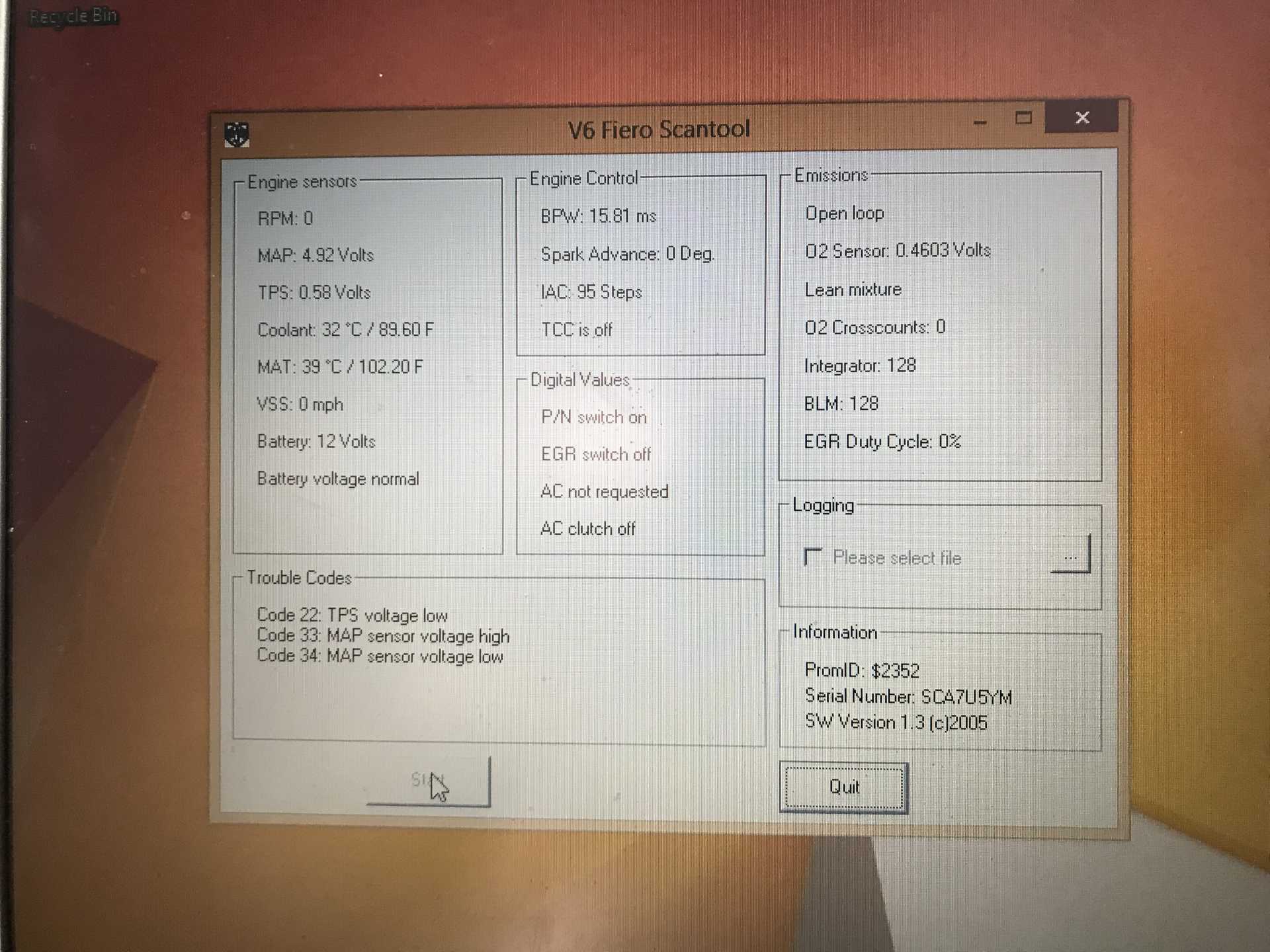 [This message has been edited by Kitskaboodle (edited 05-10-2025).]
|
|
|
|
Vintage-Nut
|
MAY 10, 10:35 AM
|
|
| quote | By the way, I still have those 3 stored trouble codes. (see lower left of scantool screenshot)
How do I erase them? Can I simply disconnect the battery for an hour or so and erase them that way? |
|
Yes
|
|
|
|
Kitskaboodle
|
MAY 10, 11:21 AM
|
|
Ok, thanks for confirming that Vintage-Nut. 😊
If I have time later today, I will do just that, re-start the car and see how it idles & runs at this point down the road. Fingers crossed……. Kit
|
|
|
|
Kitskaboodle
|
MAY 11, 03:20 PM
|
|
Ok, car is fixed and running great. 😀
Idle is now 800 in Drive and 900 in neutral.
It turns out that a number of years ago I replaced the map sensor pigtail connector because the clip broke on the original one. Well, the replacement I bought was a cheap aftermarket one and believe it or not, the 3 plastic “tubes” (that house the wire pins) were molded a little too long in length, causing the pins to not fully seat into the underside of the map sensor. I tried to grind down the tubes and then re-connecting it but it was still showing zero voltage. So, at this point I took the pins/wires out of the harness and plugged them one by one directly into the map sensor female pins. It’ll work until I get the new GM map connector pigtail.
In the end, I’m not sure exactly what fixed the problem. It could have been just the map connector issue or a combination of that plus something I installed previously to finding the map sensor issue. (IAC, MAT, Coolant sensor, etc.)
Here is a pic of the actual pigtail connector I tried to grind down and make work.
Lastly, thanks again to all for helping me at every step along the way. 😀
|
|
|
|